Showing posts with label Topics. Show all posts

Monday, February 15, 2016

Create Roles for Functional Tasks - A Shortcut

Every project requires the creation of SAP Security Roles for the various Functional Tasks that are part of their ERP process. This is a laborious task and requires quite a bit of planning and coordination.

One primary task for Role Design is to list down the relevant Transaction Codes for a particular Role that you need to design.

What if I told you there is an easy way to build your Roles?

Let's say you need to build an Accounts Payable Role. You can take help from SPRO for this.

Here's how:

1.  Tcode SPRO_ADMIN: Create a new IMG project


2. Click on 'Change Selection'


3. Select the relevant IMG Node. In our case, we will select Accounts Payable
4. Next, we need to Generate the new project

5. Now, we go to PFCG, to add this new project in a Role.
    Create a new Role - Do not add anything in the Role Menu.
    Go to Utilities -> Customizing Auth


6. Select IMG Project and select the project that you created


7. The Role will be populated with all the relevant Tcodes needed for Accounts Payable.


Now you can analyze these Tcodes and modify/trim the Role according to your requirements.

Monday, February 8, 2016

S_TABU_LIN - Table Access at Row Level

S_TABU_DIS allows access to Tables of a particular Authorization Group
S_TABU_NAM provisions access to particular tables
But, what if you want to restrict access to particular rows within a table?

This is where Authorization Object S_TABU_LIN comes into picture. You must have already heard about. But implementing the Authorization check using S_TABU_LIN is a bit tricky.

Let's go through with the process of applying a check on S_TABU_LIN on particular rows within a Table:

The Authorization Object has 3 Fields: Activity, Organizational Criteria and Attribute


The first step in implementation of line authorization is defining an Organizational Criterion

As an example, we will put a restriction on Table - T77DB - Shift Groups. So, only Roles with access specific Shift groups will be able to view/change the data for these shifts.


You can define then using Tcode - S_BCE_68001484 OR via SPRO


We create a new Criteria: SHIFTGROUP


Now we create the Attribute. We will call the Attribute as SHIFTGROUP as well:

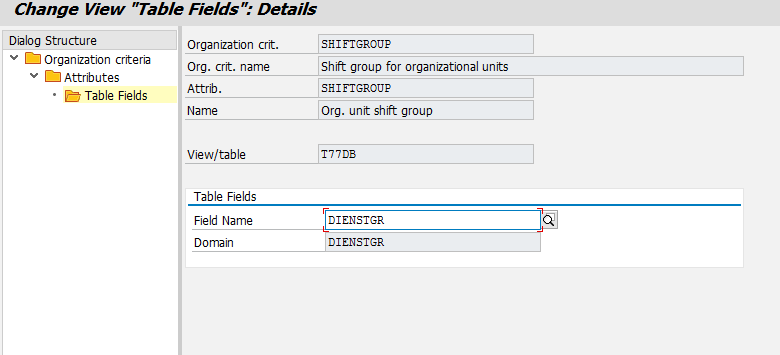
Next step is to link it to the table T77DB and the Field - DIENSTGR (Shift group)

Now we go to Role and add the values to the the Object S_TABU_LIN

Now, this Role will hav eChange access to Shifts of ERP-TMC only.

Thursday, February 4, 2016

Change Log for HR Organizational Structure Changes

SAP provides the option of activating Change Logs on HR Organizational Structure. So if an error or an oversight occurs or you change or delete some data, you can refer to change logs and rectify the issue.

Setting up Change Logs 

In SM30, go to table T77CDOC_CUST. In this table, enter the Plan Version and Infotype for which you want to activate the logging by using the New Entry button.

We will enable logging for all Role assignment changes to a Position and all Person assignment changes for a Position. So, the relationships are B007 for Role assignment and A008 for Person assignment.


Check the 'Active' Check-boxes and Save.

Now, let's make a change to a Position

So, I changed the End date of a Person 20000428 to 31.12.2016. Earlier the End date was 31.12.9999.


Checking the Change Logs

To check the Change logs we Report RHCDOC_DISPLAY
Go to SE38 and execute this Report.

Enter the Plan Version, and the Position number for which you need to check the logs

The logs shows that the Relationship A008 was deleted for the time period 31.12.9999 and created for 31.12.2016


Now you can easily track all Organizational changes.

Tuesday, February 2, 2016

Composite Profiles

312 is a somewhat famous number in SAP Security. It is the maximum number of Profiles that can be assigned to a User.

A bit of detail around this fascinating number:
The relationship between a user ID and authorization profiles is of type one to many (1:n, meaning one user can have many profiles assigned). From a technical point of view, you expect (behind the scene) that there’s a table in which there are many records that show the number of profiles assigned to the user. Unfortunately there is only one record in Table USR04, and the profiles are all concatenated in the PROFS field. If you divide the length of field PROFS by the length of a single profile, you'll come up with the number 312.

It ever so happens that sometimes you end with users having so many Roles (especially in Development system) that the number of Profiles exceeds 312 and the user doesn't get the required Authorization due to some of the Profiles not being available in USR04.

Unfortunately, there is no system parameter you can use to avoid this limit.

But there is a workaround, albeit it's somewhat sketchy and has disadvantages.

Enter - Composite Profiles

Just like Composite Roles, you also have Composite Profiles. 
With Composite Profiles, you can combine multiple Profiles into one and assign it to the User, thereby reducing the number of Profiles.

The reason why this is not used and also the reason why you haven't heard of this before is that SAP best practice is to use only the “roles concept” thorough Transaction PFCG (Role Maintenance), and direct Profile assignment is not encouraged.

Reason 2 for this being discouraged - if PFUD (Compare User Assignments) is run with the 'Cleanups' option selected, then the direct profile assignments will be removed. 

But, let me take you through the process of creating profiles so that you can use it if ever needed.
  • Execute Transaction SU02, enter your profile name, and press Enter

  • Select 'Create' from the Menu

  • Select 'Composite Profile'

  • Enter the list of existing Profiles that you want to to add and Save.
         You can find the Profiles for a particular Role from table - AGR_PROF


There you go. Your Composite Profile is now ready and you can assign it to the User. But don't forget the reasons listed above.

On a different note - Did you know Mars is called the Red Planet because during the Cold War it sided with the Communists...... No that's not true. I was just pulling your leg. Keep scrolling.

Sunday, January 31, 2016

Closing the 'Called Transactions' Loophole


Let's say a User executes ME23N to display Purchase Orders. If he now wants to display a Vendor (Purchasing), he can. You may think that this is because he has access to MK03. But, even if this User Master does not have access to MK03, he would still be able to display Vendors.

The reason - MK03 is a 'Called Transaction' for MM23N.

So, what's a Called Transaction?
Well within ABAP programs there are these statements CALL TRANSACTION XXXX
Whenever SAP encounters this statements, it checks for this Table - TCDCOUPLES.
This table has the mapping of Calling Tcode and Called Tcode. In our example, ME23N is the Calling Tcode and MK03 is the Called Tcode


The column to focus here is the Check ID. If the value for that Field is Blank or 'N', then the Calling Tcode can access the Called Tcode without needing any Authorization Check.


So, now you want to restrict access to MK03 from ME23N.
We use Tcode SE97 to change the value of Field Check ID


Change the Check ID to YES and Save.


Now, only if the user has access to MK03, can he/she display the Vendor from ME23N.

You can do a quick review of the sensitive 'Called Transactions' and make sure that there isn't any unwanted access leaks.

SE93 - Authorization check without ABAP code changes

Let's say you created a new custom Tcode. Usually, to enforce a authorization check, you need ABAP code change. But you can enforce this check directly in SE93, while creating the custom Tcode. No ABAP code change needed. 

However, you can only perform this check on 1 Authorization Object. If you require Authorization check for multiple Authorization Objects, then you need to make ABAP code change.
It's a good thing that most of the time, the custom Tcodes are don't need more than Auth Object. So, this is a handy trick to know.

Here's how:


  • Go to Transaction Code SE93, and enter the Tcode and select Change


  • Here you can enter the relevant Authorization Object and also enter the values for which you want the Tcode to be restricted


Find Tcodes and Programs that use a particular Authorization object

Authorization Groups help restrict access to SAP Tables. Our favourite Authorization Object – S_TABU_DIS utiliz We can use SU24 to find the Authorization Objects that are checked for a particular Tcode.

But how do you find which Tcodes are checking a particular Authorization Object?

For e.g. let's say you have a custom Authorization Object. Over the years, multiple custom Tcodes have been restricted using this Authorization Object. How do you find which Tcodes have used this Object.

Here's how:
  • Go to Tcode SE80 -> Repository Information System -> Other Objects -> Authorization Objects


  • Enter the particular Authorization Object and click on the 'Where Used List' option. In our example we check for K_PCA

  • Select Programs, Transactions, BSP Application, etc. as per your requirement.


  • You will now get the list of Transactions and Programs that use K_PCA


Deleting a Transport after it is Released

Sometimes you find yourself in the pickle where you have Released a Transport in Development system, but in hindsight you realize that it contains incorrect objects that should not be moved to QA.
It’s not a big deal if the Transport just sits in Development. But with hundreds of transports being created every month, there is a always the chance that it might accidentally make it’s way to QA. So, it’s better if you delete it. Now you can either get in touch with Basis and ask them to do it from OS level. But there is an easier way to delete it from SAP and you can do it in 4 easy steps:
  • Go to Transaction SE38 or SA38 and execute program: RDDIT076
  • Enter Transport Request number and run the program
You will see the status of the Transport Request and the Task is ‘Released’
1
  • Now double click on the Task and you should be able to edit the status
2
  • Change status from R to D and save
3
  • Do the same for the Transport Request
  • Now, the Transport Request is ‘Modifiable’ and you can delete it.

SE54 - Assign Authorization Group to a Table

Sometimes there is a need to create a custom table in SAP. The Functional team want to restrict access to this Table.

Viola! - Authorization Groups

You could use S_TABU_NAM, but there is chance that there are tens of custom tables in your system and maintaining them individually in Roles can get out of hand. So, it's better you club them together in logical groupings - under Authorization Groups.
For example have an Authorization Group for Sensitive Finance Tables - ZFI_S

Then you can use S_TABU_DIS to provision access to these tables.

To assign an Authorization Group to an table:
  • Go to Transaction Code SE54, enter the Table Name and select Assign Authorization Group

  • Here you will find the list of all Tables which already have Authorization Groups assigned. Click on ‘New Entries’ and add your table and the relevant Authorization Group